AutoStack
- NightAstro tells you what to image.
- AutoStack stacks in one click.
- Finish post-processing with the software of your choice.
AutoStack automates the preparation, alignment and stacking of your deep-sky images using Siril. No advanced knowledge of Siril is required.
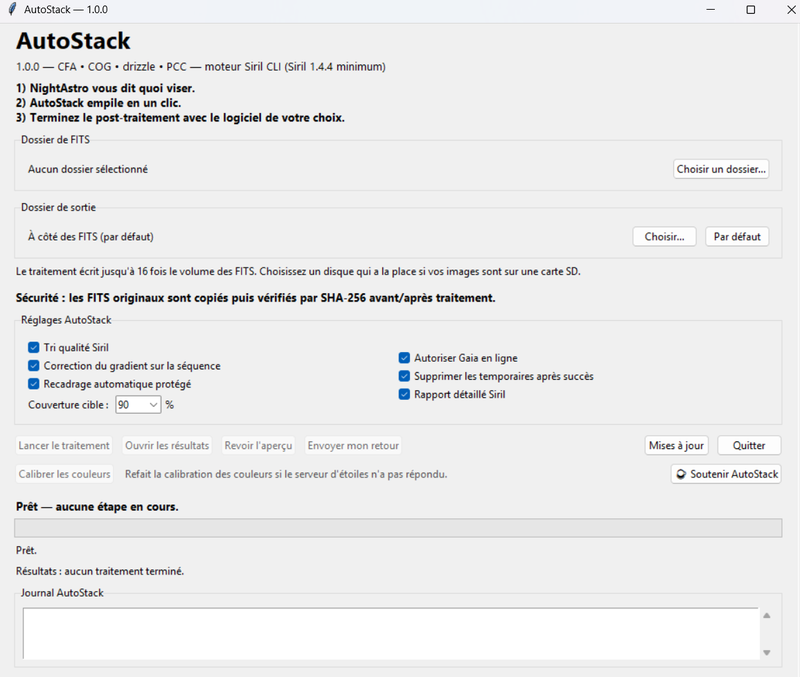
Version 1.0.0, the first official release. Free.
Download
AutoStack_v1.0.0.zip (23 MB, Windows)
How it works, in three steps
- Copy your FITS files from the telescope internal storage to a folder on your computer (USB or Wi-Fi).
- AutoStack prepares the files and controls Siril : cleaning, alignment, selection of the best images, stacking and colour processing.
- You get the stacked image (16-bit TIFF, linear master, colour version and PNG preview) ready for editing in Siril, Lightroom or the software of your choice.
Requirements
- Windows 10 or 11
- Siril 1.4.4 or newer, installed
- Compatible FITS files: Seestar S30, S30 Pro, S50 and S50 Pro; DWARF II, DWARF 3 and DWARF mini; Celestron Origin
- Enough disk space: processing writes up to 16 times the size of your FITS files
- Optional: Siril local Gaia catalogue (about 1 GB), which avoids online server outages
Installation
- Right-click the zip file, then choose “Extract all…” (do not run AutoStack from inside the archive).
- Open the extracted folder, then run AutoStack_v1.0.0.exe.
- If Windows displays “Windows protected your PC”: the application is not digitally signed, which is expected. Click “More info”, then “Run anyway”.
- Choose the folder containing your FITS files, then click “Start processing”.
What AutoStack does, step by step
- Preparation and safety. AutoStack works on copies, never on your originals. It verifies their SHA-256 checksum before and after processing and stops if any file has changed.
- Reading and conversion. Frames are read, sorted by date and converted for Siril.
- Cosmetic correction. Hot and cold pixels are corrected image by image.
- Background gradient. The gradient in each frame (light pollution or Moon glow) is removed before alignment.
- Alignment. Siril identifies the stars in each frame using the Gaia catalogue and then aligns them. If the catalogue cannot be reached, AutoStack retries and then aligns using the stars alone.
- Quality control. Blurred, trailed or poorly aligned frames are discarded. The report states how many images were kept.
- Stacking. The selected frames are combined to reduce noise and bring out the target.
- Colour and cropping. Colours are calibrated using Gaia stars. If the server does not respond, they are balanced from the stars themselves, and the “Calibrate colours” button lets you try again later. Black edges are cropped.
- Output files. The linear master (
*_MASTER_LINEAR.fit), the colour version (*_COLOR_LINEAR.fit), a 16-bit TIFF for editing, a PNG preview and a readable report.
AutoStack stacks; it does not post-process : for stretching, colour and noise reduction, open the master or TIFF in the software of your choice.
What is new in 1.0.0
- Colours balanced from the stars
- “Calibrate colours” button if the star server did not respond
- Local Gaia catalogue used first when installed
- Simplified window
Help AutoStack improve
If you encounter a problem or have a comment, use the “Send feedback” button in the software or the feedback form.
Support AutoStack
AutoStack is free. If you find it useful, you can support the project on Ko-fi.
NightAstro and AutoStack are independent projects. Mentioned trademarks belong to their owners. Images remain the property of their authors.