AutoStack 2.0: new interface, mosaics and video stacking
AutoStack 2.0 is out. Still one click, but with much more: a new interface, mosaics and, a major new feature, video stacking for the Moon, the Sun and the planets.
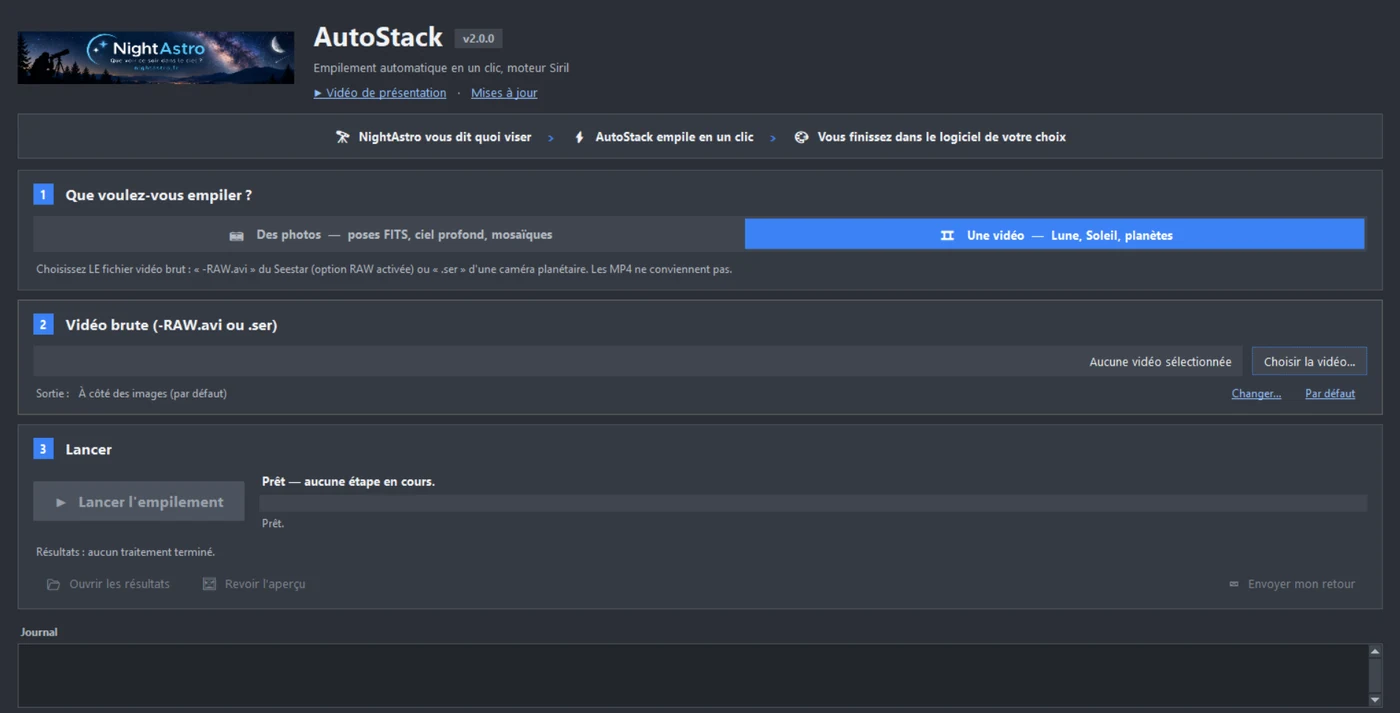
A new interface, in three steps
The window has been completely redesigned, with a softer charcoal-grey theme. Everything happens in three numbered steps:
- 1. What do you want to stack? “Photos” (your FITS frames) or “Video” (Moon, Sun, planets). The window adapts to your choice and tells you which file to pick.
- 2. The folder or the video: the folder with your FITS files, or the video file itself.
- 3. Start: a large “Start stacking” button, with the current step and the progress bar right next to it.
Advanced settings are now collapsed: beginners have nothing to change, regular users find them in one click.
Mosaics, detected automatically
Did you shoot a large target as a mosaic with your Seestar? AutoStack detects it on its own, places each frame on the sky using the Gaia star catalogue and stitches the panels over the full field. Nothing to set up: choose the mosaic “_sub” folder and start.
For a mosaic, the Gaia catalogue must respond (online or installed on your computer), and more disk space is needed.
New: video stacking (Moon, Sun, planets)
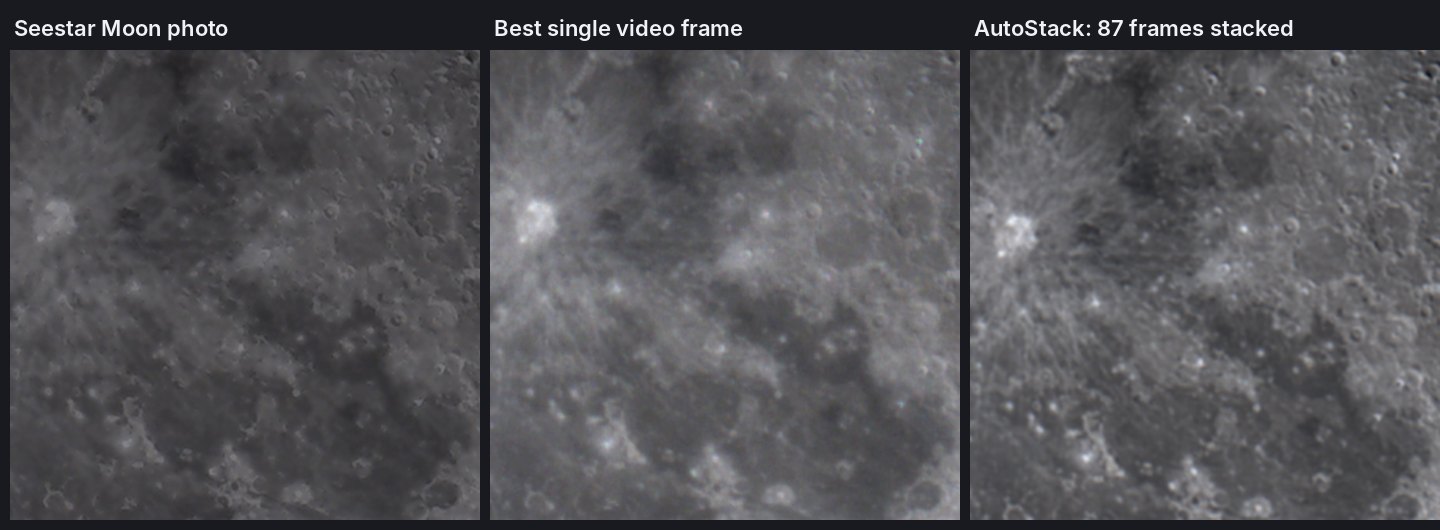
AutoStack can now stack a video. It scores the sharpness of every frame, keeps the best quarter, aligns them precisely, stacks them and sharpens the details. On the Moon the gain is striking compared with a single frame: the noise disappears, craters and rays stand out clearly.
Which videos? You need a raw, uncompressed video:
- Seestar: enable the RAW option when recording, then choose the file ending in -RAW.avi (Lunar_video or Planetary_video folder).
- Planetary cameras (ZWO, Player One, QHY… with FireCapture, SharpCap, ASICap): record in SER format, or as uncompressed AVI.
- MP4 videos are not supported: compression wipes out the fine details.
Processing a video takes from a few seconds to a minute, with no Internet connection needed.
Also new
- Subfolders: if your frames are spread over several folders, simply choose the folder that contains them all.
- Updates: a window tells you at startup when a new version is available.
- Your originals stay safe: AutoStack works on copies, verified with SHA-256 before and after processing.
Compatibility
- Photos (FITS): Seestar S30, S30 Pro, S50, S50 Pro; DWARF II, DWARF 3, DWARF mini; Celestron Origin.
- Videos: any raw SER or uncompressed AVI video.
- Computer: Windows 10 or 11, with Siril 1.4.4 or newer installed.
How to update
Already using AutoStack 1.0? Download version 2.0 from the AutoStack page, extract it and run the new executable. Your previous results are left untouched.
⬇ Download AutoStack 2.0: https://nightastro.fr/outils/autostack/
▶ Watch the video presentation: https://www.youtube.com/watch?v=_D2m1A34sqc
This video was recorded with version 1.0: the interface has changed, but the principle is the same (choose, start, get your image). A new video showing version 2.0 and the stacking of a Moon video is in preparation.
A comment or a problem? The “Send feedback” button is in the software. Your feedback shapes the tool, and first tests of mosaics and videos are especially welcome.
NightAstro